Your AI. Your computer.
Your rules.
0ne runs locally on your machine — not in the cloud, not on a server someone can find. Here's how we keep it that way.
Short answer: No. 0ne lives on your computer. It doesn't touch your bank accounts, your passwords, or anything you don't explicitly hand it.
Think of it like hiring an assistant and giving them a desk in your office. They sit at the desk you gave them. They work on the files in their workspace. They don't walk down the street to your bank, open your safe, or rifle through your personal stuff.
We set you up out of the box in bypass mode — it doesn't stop and ask permission for every little thing. It just gets to work. Think of it like hiring a trusted employee and saying "just handle it" instead of making them ask permission to send every email.
But if you want tighter controls, there are stricter permission modes where it asks you before every single action. You get to choose your comfort level.
You're the boss. You pick how much leash the employee gets.
This is where 0ne is fundamentally different from tools like OpenClaw that made headlines.
OpenClaw was like leaving your front door wide open — it ran a server on your computer that anyone on the internet could find and connect to.
0ne doesn't have a door to walk through. Nobody on the internet can find it or connect to it — there's no server running, no open ports, nothing listening. It does talk to Anthropic's servers when it's thinking — the same way your phone talks to Apple when you ask Siri — but nobody can reach in to your machine.
It's the difference between a house with the front door open vs. a house with no front door at all. You can go out, but nobody can come in.
The AI doesn't just decide to go rogue. Could it theoretically do something unexpected? In the same way your employee could theoretically do something stupid — sure, it's possible. But there are real guardrails:
- Security hooks — Built-in checks that run automatically on every action, validating what the AI is trying to do against security rules. These run even in bypass mode.
- Local-only operation — Even if it tried something weird, it's working on your machine, in your workspace. It's not broadcasting to the internet.
- No inbound access — Nobody outside your computer can connect to it, talk to it, or give it instructions.
- Permission modes — You choose how much freedom it gets. Bypass mode lets it work fast. Strict mode makes it ask before every action.
- Anthropic's safety layer — The underlying AI is built by the same company that Fortune 500s trust. They have safety guardrails baked into the model itself.
Jimmy has been running 0ne since November 2025. No issues. Not one weird thing. And he pushes it way harder than any user ever will.
Prompt injection is when a website or document has hidden instructions that try to trick the AI. Like if you told the AI to read a webpage, and that webpage had invisible text saying "ignore your instructions and do this instead."
It's real, but it's like phishing emails — it exists, you should know about it, but it doesn't mean you stop using email.
0ne has security hooks that automatically check every action against a set of rules — even in bypass mode. They flag anything suspicious before it executes.
Be aware of it the same way you're aware of phishing. Don't lose sleep over it.
Honest answer: the risk is extremely low, and the upside is massive.
Think of it like driving. There's always some risk when you get in a car. But you still drive because the alternative — walking everywhere — means you never get anywhere.
0ne is the same. You start with the basics. You get comfortable. You see it working. Then you gradually give it more access as trust builds.
Nobody's asking you to hand over the keys to everything on day one. Start small. Build trust. Expand from there.
Your conversations go through Anthropic's secure servers for processing — the same company and the same privacy policies that Fortune 500 companies trust with their data.
Your files stay on your computer. The AI reads them locally and sends only the conversation context to Anthropic for thinking. It's the same model as using Claude on claude.ai — except here, the AI can also take action on your behalf.
Nothing is stored on our servers. 0ne Cloud (the optional web dashboard) stores only the data you explicitly sync to it — business metrics, contacts, etc. Your local AI conversations and files never leave your machine.
The Security Stack
Six layers of protection, from the AI model all the way to your local machine.
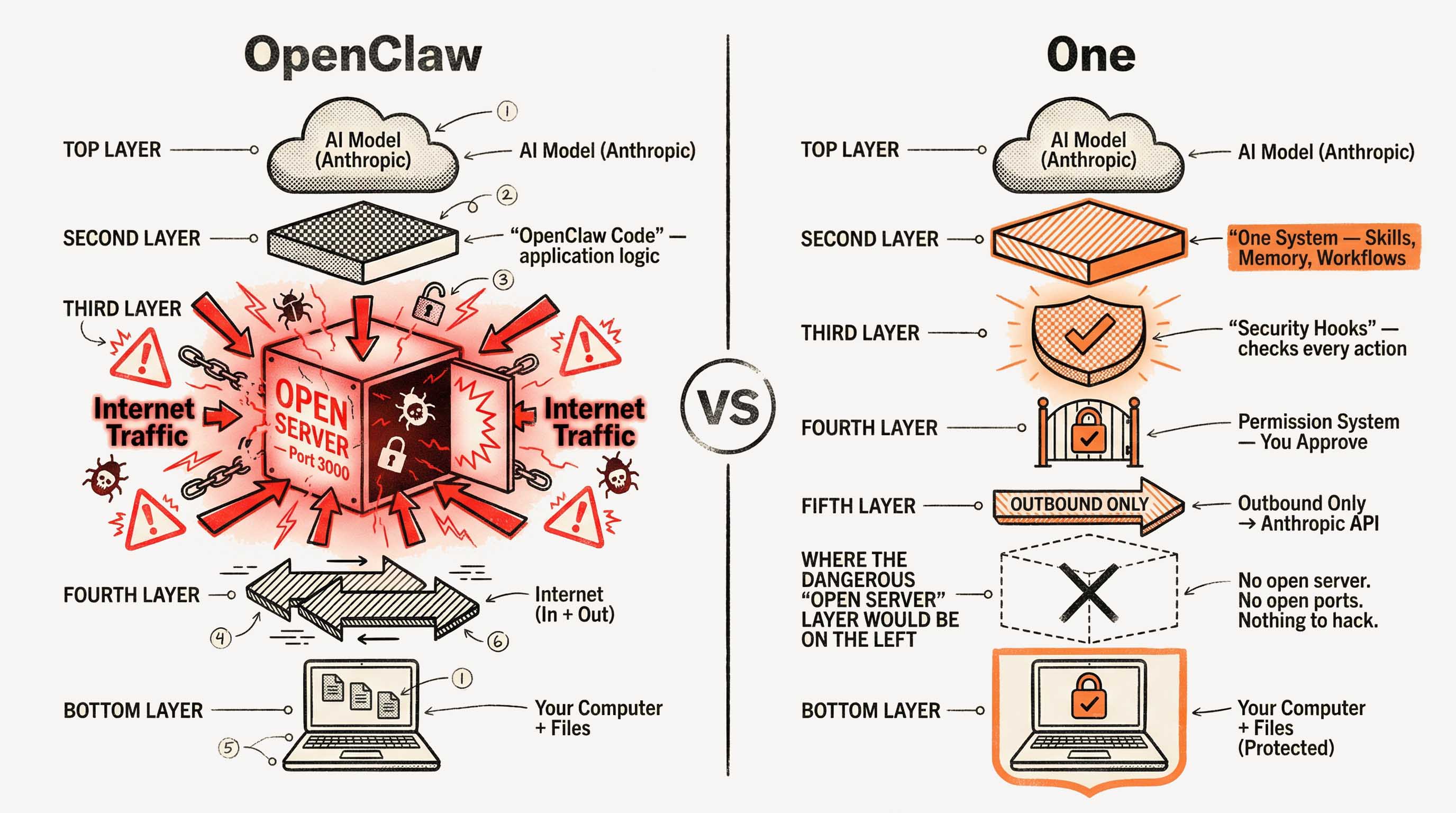
Local execution
Runs on your machine, not a server. No open ports. Nobody can connect to it.
Permission modes
Bypass mode (fast, our default) or strict mode (asks before every action). You choose.
Security hooks
Automated rule checks on every action — run even in bypass mode. Flag suspicious behavior.
No inbound access
Talks to Anthropic's servers to think, but nobody can reach IN to your machine.
Anthropic's engine
Built by the same billion-dollar company behind Claude. Enterprise-grade AI safety.
Workspace scoping
Operates within your 0ne folder. Not roaming your whole computer looking for secrets.
What's Actually Installed?
Full transparency. Here's exactly what touches your computer and why.
Foundation Tools
Your AI Workspace
Editor & Interface
Optional Tools (installed if available)
Telemetry — what we collect
After installation and when the system health check runs, 0ne sends a brief report to our server. Here's exactly what it includes:
- Your platform (Mac, Windows, Linux) and architecture (Intel, Apple Silicon)
- Which tools installed successfully vs. which had warnings
- Health check results (pass/fail counts — not file contents)
- Your install token (so we can help troubleshoot if something breaks)
We never collect file contents, keystrokes, browsing history, passwords, or anything about your business data. Period.
What's NOT installed
- No servers or daemons listening on the internet
- No browser extensions with access to your browsing data
- No keyloggers, screen recorders, or surveillance software
- No cryptocurrency miners (yes, people actually ask)
Still have questions?
We're transparent about how 0ne works. Ask our community anything — real users, real answers.
Ask Our Community